Adding Stripe Payments to an AI-Built App
The hidden complexity between a working button and sustainable revenue collection.

Getting an AI builder to add a "Subscribe Now" button takes about ten minutes. Getting that button to reliably charge the right amount, grant the right access, and survive a failed card, a refund, or a customer who closes the tab mid-checkout takes a lot longer, and it's the part almost nobody budgets time for. This piece walks through what a production-ready Stripe integration actually requires, from account setup through live traffic, written for builders who didn't write a line of the code themselves.
The market these builders are stepping into is not small. Statista projects global digital payments volume will top $11 trillion by 2027. Gartner expects 75% of new applications to be built with low-code or no-code tools by the end of 2026, up from under 25% in 2020. Solo-founded startups grew from 23.7% of new startups in 2019 to 36.3% by mid-2025. The people shipping these apps are, more and more, doing it alone, with an AI tool instead of an engineering team. Andrej Karpathy gave this approach a name in February 2025, "vibe coding," and it's spread fast through the indie hacker world. Thousands of apps built this way go live every week. Plenty of them stall at the exact moment they try to charge someone money.
What Stripe is, what it costs, and why it is the default starting point
Stripe is a payments processor that handles the parts of taking money online that nobody wants to build themselves: card validation, 3D Secure authentication, fraud screening, PCI compliance. All of it happens inside Stripe's own hosted checkout page. The builder's app never touches a raw card number, never stores payment data, never has to think about compliance audits.
The pricing is flat and predictable. No monthly fee on the standard plan, no setup cost, no minimum volume requirement. The only charge is 2.9% plus $0.30 per successful transaction, and for subscriptions, add an additional percentage fee for Stripe Billing. Run the numbers on an actual product: a $19 subscription costs $0.85 in fees, so the builder keeps $18.15. A $49 subscription costs $1.72, leaving $47.28. There's no financial risk to setting any of this up before the first customer even exists, because the fees only apply once revenue does.
Stripe's documentation is, by wide consensus, the best in the payments industry, and that matters for a reason specific to AI-built apps: the documentation is what large language models trained on when they learned how to write payment integrations. That's a big part of why AI-generated Stripe code tends to follow sane, established patterns rather than improvising something fragile.
Paddle is worth knowing about as the main alternative. It works as a merchant of record, meaning it handles VAT and sales tax compliance for the builder rather than passing that burden along. That makes it a reasonable choice for a product selling internationally from day one. But for most early-stage apps, Stripe is still the right place to start. It supports one-time payments and recurring subscriptions natively, so a product doesn't need to switch providers later just because its pricing model changes.
Setting up a Stripe account and creating products before touching the app
Signing up takes minutes. Name, email, password, no code required. Stripe then asks for a business name (or the builder's own name, if operating as a sole proprietor) and some basic details before it will process live payments.
Two API keys matter here. The publishable key starts with pk_test_, and the secret key starts with sk_test_. The secret key should never show up in frontend code, and it should never get committed to a code repository. Many AI app builders connect to Stripe using a restricted API key rather than the account's full secret key, and it's worth confirming which one a given builder is requesting, and why.
Products should get created manually in the Stripe dashboard first, not generated on the fly by the AI. Go to Dashboard, then Product Catalog, then Add Product. Doing it this way produces a stable Price ID, starting with price_, that can be referenced the same way across every prompt and every session, rather than an AI improvising a new price object every time it touches the checkout flow.
The Customer Portal deserves setup before a single user signs up. Dashboard, then Settings, then Billing, then Customer Portal. Turn on cancellation and payment-method updates. Stripe hosts this page itself, which means the builder never has to design or build any subscription-management screen at all.
These three things, plans and prices, API keys, and the customer portal, all live outside the app entirely. They're decisions recorded in an account that stays in the builder's name no matter who, or what, wrote the integration code. And none of this requires banking details or live keys yet. Everything at this stage runs in test mode. Real money comes later, after testing is done.
How the payment flow actually works, and where most AI-generated integrations break
The correct flow has five steps. The app creates a checkout session on its server, passing along the Price ID, success and cancellation URLs, and optionally the customer's email. Stripe returns a hosted checkout URL that lives on Stripe's own domain. The user types their card details into that Stripe page, never into the app itself. Stripe processes the charge and redirects the user back to the app's success URL. At the same time, separately, Stripe sends a webhook event to the app's server confirming the payment went through.
That redirect back to the app is not proof of anything. It's a client-side event happening in the user's browser, and a browser is not a reliable witness. This is the single wrong assumption baked into almost every AI-generated Stripe integration: it grants product access the moment the success page loads.
Here's how that assumption breaks in the real world. A user pays, then closes the browser tab before the redirect finishes loading. They paid. They get nothing. Or, worse, a user simply types /success into the address bar without paying at all, and the app hands over the product for free.
The webhook is the only signal that actually confirms payment happened. Stripe says this outright in its own documentation: fulfillment belongs on the webhook event, and the success page is a confirmation screen, not a trigger. Stripe's own 2026 benchmark study, "Can AI agents build real Stripe integrations?", documented dropped webhooks, stale subscription state, duplicate charges, and live test keys left sitting in production as recurring failure patterns across the AI-generated integrations it audited. An IndieHackers survey found that founders who used Stripe Checkout and the Customer Portal, instead of building custom payment UI from scratch, launched 4.2 times faster. That gap exists precisely because the hosted tools sidestep the failure modes above.
Webhooks: what they are, what they must do, and how to tell if yours is wired correctly
A webhook is just an HTTP request, a POST, that Stripe sends to a server URL the builder specifies. Nothing about it depends on the user's browser session or anything the user clicks.
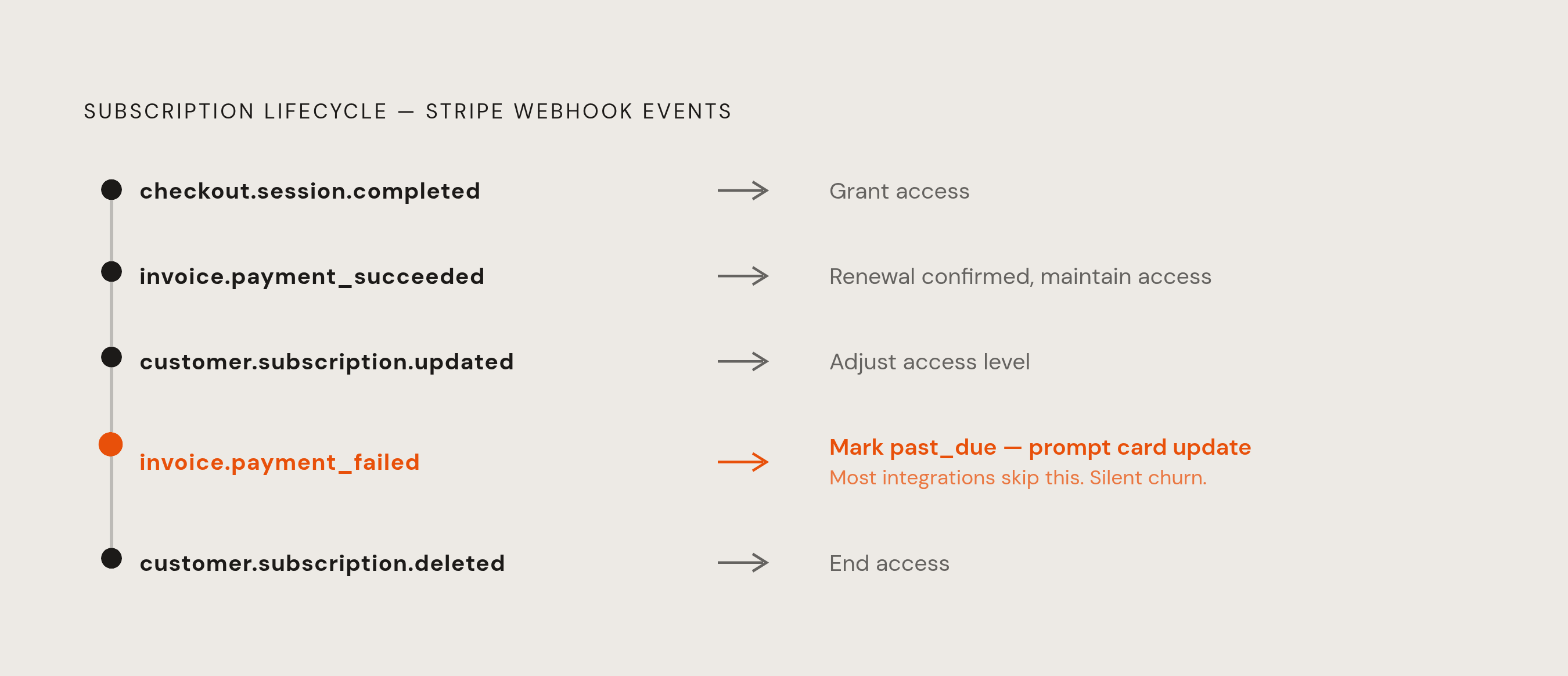
Five events matter more than the rest. checkout.session.completed fires when a checkout session is completed, and it's the trigger for granting access. customer.subscription.updated fires when a subscription is updated, which may mean the access level needs to change too. customer.subscription.deleted fires when a subscription is deleted or ends. invoice.payment_succeeded fires when an invoice payment is successfully processed. invoice.payment_failed means a renewal failed and Stripe is now retrying it.
The webhook handler itself needs to do three things, and AI builders skip these constantly. First, verify the Stripe signature on every request using constructEvent against the raw request body. Skip this step, and anyone on the internet can POST a fake "payment succeeded" event and get free access to the product. Second, return a successful response within a few seconds, since Stripe retries anything slow or failed, which opens up the next problem. Third, be idempotent: if the same event arrives twice, which Stripe's retry system can absolutely cause, processing it twice must not double-charge anyone or grant duplicate access. Use the event's ID to deduplicate.
That idempotency point deserves unpacking, because it's subtle. Webhooks can arrive out of order, or more than once. An integration that isn't built to handle that can end up with subscription state in the database that no longer matches what Stripe actually shows. The fix is to treat every event as a prompt to verify current state rather than blindly applying the payload, and to use the event ID as a deduplication key in the database.
A second common gap: integrations that create Stripe customers without ever linking them to an internal user ID. Every lookup afterward becomes a guessing game. The fix is to link the internal user ID to the Stripe customer at creation time, and ensure lookups by Stripe customer ID are fast and reliable from that point forward.
Checking whether any of this is actually wired correctly is simple. Stripe's dashboard exposes a log of every webhook event it delivered, along with whether the endpoint responded successfully. Check that log after every single test purchase, not just after the checkout itself appears to work.
Subscription state: how to gate features correctly across the full subscription lifecycle
A Stripe subscription moves through five named states, and the app's database needs to track all of them and act accordingly. Trialing means the user is in a free trial. Active means the subscription is paid and current. Past_due means a payment failed and Stripe is retrying it, so the user should keep access for now but get a prompt to update their card. Canceled means the subscription is over, though the user keeps access until the current period actually ends. Unpaid means every retry attempt failed, and access should end.
Feature checks belong on the backend, where the current plan gets validated against the database. Never in the frontend, where state can be spoofed by anyone with browser dev tools open.
One failure mode that regularly surfaces involves refunds. A customer disputes a charge or gets refunded, and keeps using the paid features indefinitely, because access was granted with a one-time flag at signup rather than tied to the actual current state of their subscription. The fix is to gate every feature check on current subscription state at the moment of the request, never on a flag set once and forgotten. The database should mirror what Stripe says, kept in sync by webhooks, and the access check should read that database in real time.
One-time payments and subscriptions need different logic when things end. A subscription has a period end date that has to be respected. A one-time purchase, by contrast, might grant permanent access that only gets revoked if there's a refund or a chargeback. Users also need a way to manage their own subscription without emailing support, and Stripe's Customer Portal covers cancellation, payment-method updates, and invoice history without the builder writing a single screen for it. Configure it once, link to it from the app, done.
Moving from test mode to live without leaving gaps
Flipping from test mode to live is not one switch. It's a coordinated set of changes, and missing any one of them leaves a gap.
Replace the test API keys, pk_test_ and sk_test_, with live keys, pk_live_ and sk_live_, in every environment variable that references them. Re-create the webhook endpoint inside the live dashboard and update the signing secret, since test and live are entirely separate environments with entirely separate secrets. Confirm every price reference points to a live Price ID, not a leftover test one. Then clear out the test artifacts: test customers, test subscriptions, test products, all of it.
It is worth noting that AI-generated code may reference older Stripe API versions the model was trained on rather than current ones. Worth checking whether the generated code references a current API version or one the AI happened to be trained on, since those aren't always the same thing.
Banking details need to be added before live payments can settle, so if that step got skipped earlier, it needs to happen now, inside Stripe's account settings, before the keys get switched. The actual confirmation that everything worked is simple: the first live payment shows up in the live dashboard, not the test one.
There's a quiet version of this failure that's easy to miss. A test key gets left in production. The site looks like it's taking payments. Checkouts complete. Everything appears fine. But no real money is moving, and the builder might not notice until a customer emails asking why their card statement shows nothing.
Testing the edge cases before any real customer hits them
A successful purchase is the easy case. Four other scenarios matter more, and most builders test none of them.
A declined card: does the user see a clear, specific message, or a blank screen with nothing on it? A mid-flow cancellation: does the app handle someone abandoning checkout without breaking anything? A refund: does the user actually lose access afterward, or keep it forever? A duplicate order: does double-clicking the checkout button charge the card twice?
Stripe's test mode ships specific card numbers built for exactly this kind of testing, the well-known 4242 card for a clean success, and additional test cards for other scenarios, all documented in Stripe's own testing docs. Stripe's webhook event log shows every event delivered and whether the endpoint responded successfully, which makes it possible to confirm each test scenario actually triggered the right webhook and got a success response back.
Check the subscription's actual state in the database after each test. Not whether the checkout page displayed the word "success," because that's the browser talking, not the source of truth. Simulate a failed renewal too: Stripe's test mode can trigger invoice.payment_failed on demand, and this is the moment to confirm the app correctly moves the subscription into past_due and prompts the user to fix their card, rather than failing silently and saying nothing. Only once all four scenarios pass cleanly in test mode does it make sense to bring live keys into the picture.
How MCP connectors change the Stripe integration process for AI-native builders
The Model Context Protocol, MCP, is an open standard that lets AI tools connect straight to external services through one standardized, secure protocol instead of a custom integration for each one. Anthropic open-sourced it in November 2024. OpenAI began adopting it in March 2025, starting with its Agents SDK, and expanded that support across its products in the months after. In December 2025, Anthropic handed the protocol over to independent stewardship, a move meant to keep it functioning as shared infrastructure rather than something controlled by one company.
For Stripe integrations specifically, this changes the mechanics of the build itself. Instead of an AI tool guessing at Stripe's API from patterns in its training data, an MCP connector lets it query Stripe's actual current API directly, meaning the tool can check what a live account's products and prices really are instead of inventing plausible-looking ones. That doesn't remove the need for everything covered above. Webhook verification, idempotency, and subscription-state gating still have to be built and still have to be tested against the edge cases that break them. What an MCP connector changes is the starting accuracy of the code an AI produces, not the discipline required to ship it correctly.