Building a Booking App Without Code in Claude
Claude can build a production booking app in one day without code or developers.
A non-technical founder can now build a production booking app, complete with a working front end, a real database, user accounts, and live hosting, in a single day without hiring a developer or opening a terminal. That's a genuine break from how this worked even two years ago, when a custom booking system meant weeks of a developer's time. AI-assisted building has cut that timeline by more than 70%, taking a project that ran three months in 2023 down to about two weeks in 2026, and for a simple booking app, often down to one sitting at the keyboard. The people this changes things for are showing up in the numbers already: Stripe's own data shows solo founders made up a record share of new C corps formed through Stripe Atlas in the second quarter of 2026, the highest share on record. It means the question of how one person builds and runs real infrastructure, without a technical co-founder or a contractor, is already here.
What a booking app needs to function in production
Before judging whether any build method delivers a real product, it helps to know what a booking app has to do, physically, to survive contact with actual customers. None of this is exotic. It's five requirements, and each one fails in a specific, visible way if it's missing.
Hosting means the code runs on a machine that stays on, all the time, regardless of whether the founder's laptop is open. A booking app has to keep taking appointments at any hour, whether or not anyone is watching it.
The database is where appointment records, availability windows, and customer details live between sessions. If there's no real database behind the app, a page refresh can wipe out every booking that came in that day, because nothing was ever saved anywhere permanent.
Authentication is what lets the app tell customers apart. A customer should only ever see their own bookings, and staff should only ever see the availability that's actually theirs to manage, which only works if the app knows who's asking.
Payments require an actual processor like Stripe if the app charges money for an appointment, rather than a contact form that quietly emails someone's bank details. Moving money safely is a different problem than collecting a name and a phone number, and it needs to be treated as one.
Calendar logic is where a demo and a deployable product actually part ways. If two customers try to grab the same slot in the same second, something has to make sure only one of them gets it. The decision belongs in the database itself, using a uniqueness constraint and a transaction. A non-coder doesn't need to write that logic by hand, but it helps to ask Claude to lay out the project's folder structure first, the front end users see, the backend logic behind it, and the database where everything lives, so there's a mental map before any of this gets built.
How Claude handles the build
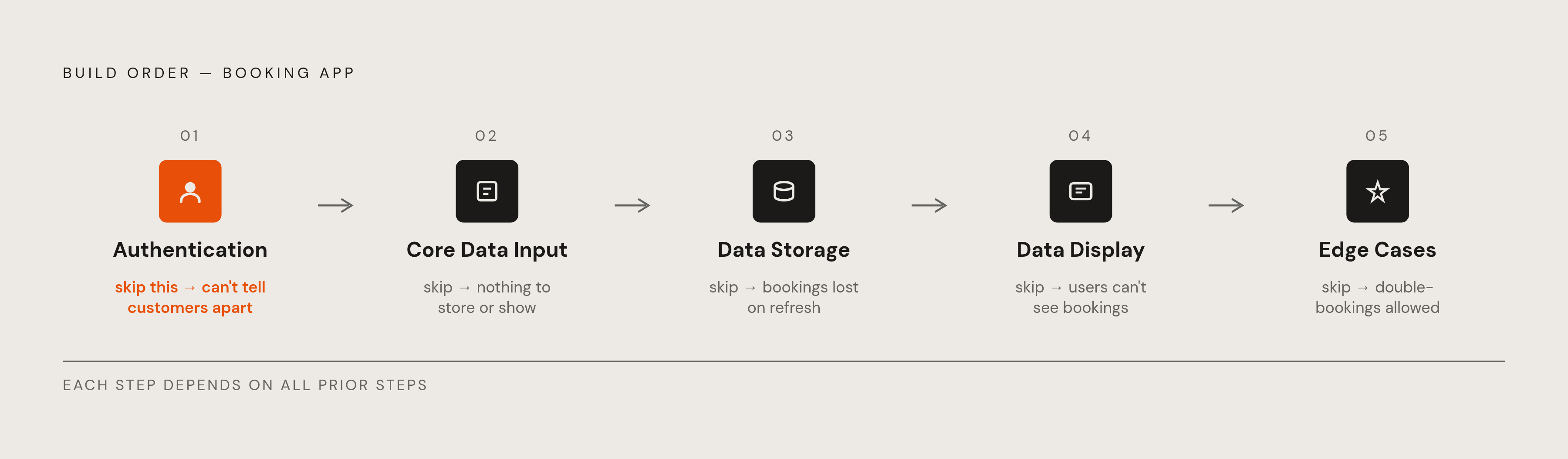
Claude can generate a booking app's front end, backend logic, and database schema inside one conversation, but the order those pieces get built in is what decides whether the result works or just looks like it does. The sequence that avoids most first-project failures runs in five steps: authentication first, then core data input, then data storage, then data display, then the edge cases. Building payment handling or reminder emails before authentication exists produces an app that can't tell one customer from another, which defeats the entire point of having accounts in the first place.
Picture the realistic version of this project: a regional service business wants customers to book their own appointments online, staff to manage their own availability, and automatic reminders to cut down on no-shows. That used to be a quarter of work for a small engineering team. Now it's a conversation.
The clearest example of Claude handling a real production concern, not just producing code that looks plausible, came when a non-technical product manager asked a direct question: what happens if two customers book the same slot at the exact same second?. Claude recognized the race condition for what it was and rewrote the booking logic to use a database-level uniqueness constraint and a transaction, so the database refuses the second booking outright, rather than leaving that job to the application layer where it can be skipped.
For someone without a technical background, the web version of Claude is the easiest entry point, since it runs on cloud machines Anthropic manages, with nothing to install and nothing to configure locally. The database connection step is where most first-time, full-stack builds stall out, so it's worth treating that step with patience rather than rushing past it toward the parts that feel more like a finished app.
MCP connectors in a booking app
Claude connectors let Claude talk directly to outside tools and data sources through the Model Context Protocol, or MCP. In practice, that means a booking app built inside Claude can check real calendar availability, trigger an actual Stripe payment, and send a confirmation email, all inside the same conversation where the app was built, rather than as a separate integration project tackled weeks later.
The mechanics run in four steps. Someone turns on a connector and signs in through OAuth, right inside Claude's settings. Claude figures out from what's being asked which connector tools apply. The MCP server then makes the actual API call using that person's own stored credentials. Claude takes the structured result and folds it back into the conversation and the app. OAuth, in plain terms, is just the handshake that lets Claude act on someone's behalf without ever seeing that person's password.
That credential detail determines what each viewer can see and do inside the app. Every connector call runs on the viewing account's own permissions, so two different people opening the same booking dashboard can see different rows of data, because their connectors resolve differently. The page itself never sees an OAuth token, only the structured result that comes back.
For a non-technical founder, using an existing connector from Claude's directory takes configuration and an OAuth login, nothing more. Building a custom MCP server from scratch is a programming task. For a booking app, the directory already covers what's needed: Stripe for payments, Google Calendar for availability, Slack for notifying staff, and email services for reminders, none of which require writing a server.
Connectors come in two flavors. Standard connectors hand Claude data that it reasons over and describes in prose, the way a calendar connector might report back on open slots in a sentence. Interactive connectors go a step further, rendering actual visual cards, forms, and buttons inside the chat, so a booking confirmation appears as a card someone can act on, not a block of text they have to parse.
Turning Claude artifacts into a live, shareable booking app with MCP connectors
Before connectors, a Claude artifact was a snapshot frozen at the moment it was built. Whatever calendar data or pricing existed during that session got baked into the HTML, and if availability changed an hour after publishing, the artifact had no way of knowing. That's the gap between a prototype and a product: a prototype shows you what the app looked like once.
Connector-backed artifacts fetch fresh data on load now, and they can refresh on a timer or when a viewer triggers an update, with responses cached in that viewer's browser so reopening the page shows cached data first and then updates once new results come back.
The artifact itself never holds an OAuth token. Claude brokers every connector call on the server side, and only the structured result ever reaches the page. A customer booking a slot does it through their own authenticated session, not through whatever credentials the original builder used to put the app together. That also applies to actions with real consequences: a booking button inside the artifact can create an actual calendar event, query or refund an actual Stripe payment, or send an actual Slack message to staff, and whichever action runs, it runs as the person who clicked the button, not as the app's original author.
Connector-backed artifacts currently work on Pro, Max, Team, and Enterprise plans, not on the Free plan. Public sharing is turned off for these artifacts entirely: sharing is limited to within an organization on Team and Enterprise, or kept private to the author on Pro and Max, no plan currently offers a public link, and a founder needs to plan around that constraint. A booking page meant for walk-in customers who've never touched Claude before can't run as a public connector-backed artifact today, since every viewer needs to be an authenticated Claude user on a qualifying plan. That limitation is addressed in the steps that follow.
Connecting the tools: a step-by-step walkthrough for a non-technical founder
Going from a blank Claude conversation to a working booking app with live connectors follows a fixed order: set up authentication, connect the calendar, connect payments, build the booking interface, attach the connectors, and publish. Each step depends on the one before it, and skipping ahead tends to produce an app that looks finished but breaks the first time a real customer uses it.
Step 1: enable connectors in Claude settings. Log into Claude.ai and go to Settings, then Connectors, a feature available on Free, Pro, Max, Team, and Enterprise plans alike. For a booking app, add connectors: a calendar service like Google Calendar, a payment processor like Stripe, and an email notification service. Each one authenticates through OAuth, and Claude stores those credentials securely without ever exposing them to the artifact page itself.
Step 2: describe the app in plain language. Open a new conversation and walk Claude through it: what service is being booked, who's doing the booking, how staff manage their own availability, and what should happen the moment a booking gets confirmed. Before any logic gets written, ask Claude to lay out a clean project structure and explain what each folder does, so the front end, backend, and database split is clear from the start. Build in order: authentication, then data input, then storage, then display, then edge cases like double-booking prevention.
Step 3: address double-booking directly. Ask Claude point blank: what happens if two customers try to book the same slot at the same time?. A correct answer involves a database-level uniqueness constraint and a transaction. If the first answer Claude gives only handles this at the application layer, push back and ask it to rewrite the logic so the database itself is the one that refuses the second booking. This is the single most important check in the entire build, because it's the one place where a subtle mistake stays invisible until two customers actually collide on the same slot.
Step 4: attach connectors to the artifact. Claude declares an allowlist of connector names at publish time, so specify exactly which connectors the booking page is allowed to call before it goes live. Test it the way a real customer would: open the artifact as a viewer, not as the builder, confirm it asks for connector authentication before making its first call, and check that booking actions run under the viewer's own account rather than the builder's.
Step 5: publish and share. Connector-backed artifacts published this way stay private to the author or shared within an organization, not posted to a bare public link. If the booking page needs to be open to the public, the more practical route is an all-in-one platform with its own built-in hosting rather than a Claude artifact, which is exactly the decision the next section walks through.
All-in-one infrastructure versus stitching connectors together
Deciding between an all-in-one platform and a stack assembled from separate connectors is a question of how much time and money a founder wants to spend managing services that have nothing to do with the actual product being sold.
Stitching together separate tools gives full control over every piece, but the costs and the complexity both add up fast. A realistic version of that stack, laid out in Momen's 2026 guide, runs a core builder at a monthly fee per project, a calendar service priced anywhere from free to a modest monthly charge, and Stripe taking a percentage plus a small flat fee on every card transaction. Each piece is manageable alone. Together, they mean separate logins, separate billing cycles, and separate points of failure to watch, for a founder whose actual job is running a service business, not administering infrastructure.
An all-in-one platform trades some of that control for speed: one bill, one dashboard, and far fewer places for something to quietly break while no one's looking. For a founder shipping a first booking app in a single sitting, that trade usually points in one clear direction. The infrastructure should disappear into the background, and the only thing that should take real effort is the business running on top of it.
Sources
- callsphere.ai
- How to Use Claude Connectors & MCP Servers: Complete Guide 2026
- Claude Connectors Tutorial: Build and Deploy a Connector to Claude (July 2026) - sunpeak
- Claude Artifacts MCP Connectors — July 2026
- What Are Claude Connectors? Data Access, Auth, Custom Setup, and Troubleshooting (July 2026) - sunpeak
- How to Build a Booking App with AI in 2026 (Step-by-Step)
- 7 Best Tools to Build a Booking App Without Code in 2026